
How We Got Our Shopify Carrier Rates Fast
Built for Shopify has a hard requirement for delivery apps. At checkout, Shopify calls carrier-rate endpoints and asks “what do you want to charge to ship this cart to that address”. If your app provides a carrier-rate endpoint it has to answer in under 500 milliseconds for 95% of calls, measured by Shopify from Shopify’s own cloud, over a rolling 28 days. Come in slower than 500ms and you won’t qualify for BFS.
Getcho’s carrier-rate endpoint is fast, plenty fast to qualify for BFS. This post talks about the engineering measures we’ve taken to make it quick. Because not only are fast rates eligible for BFS - they are also correlated with conversion rate. Every millisecond a customer stares at a loading cart is one they might abandon checkout altogether.
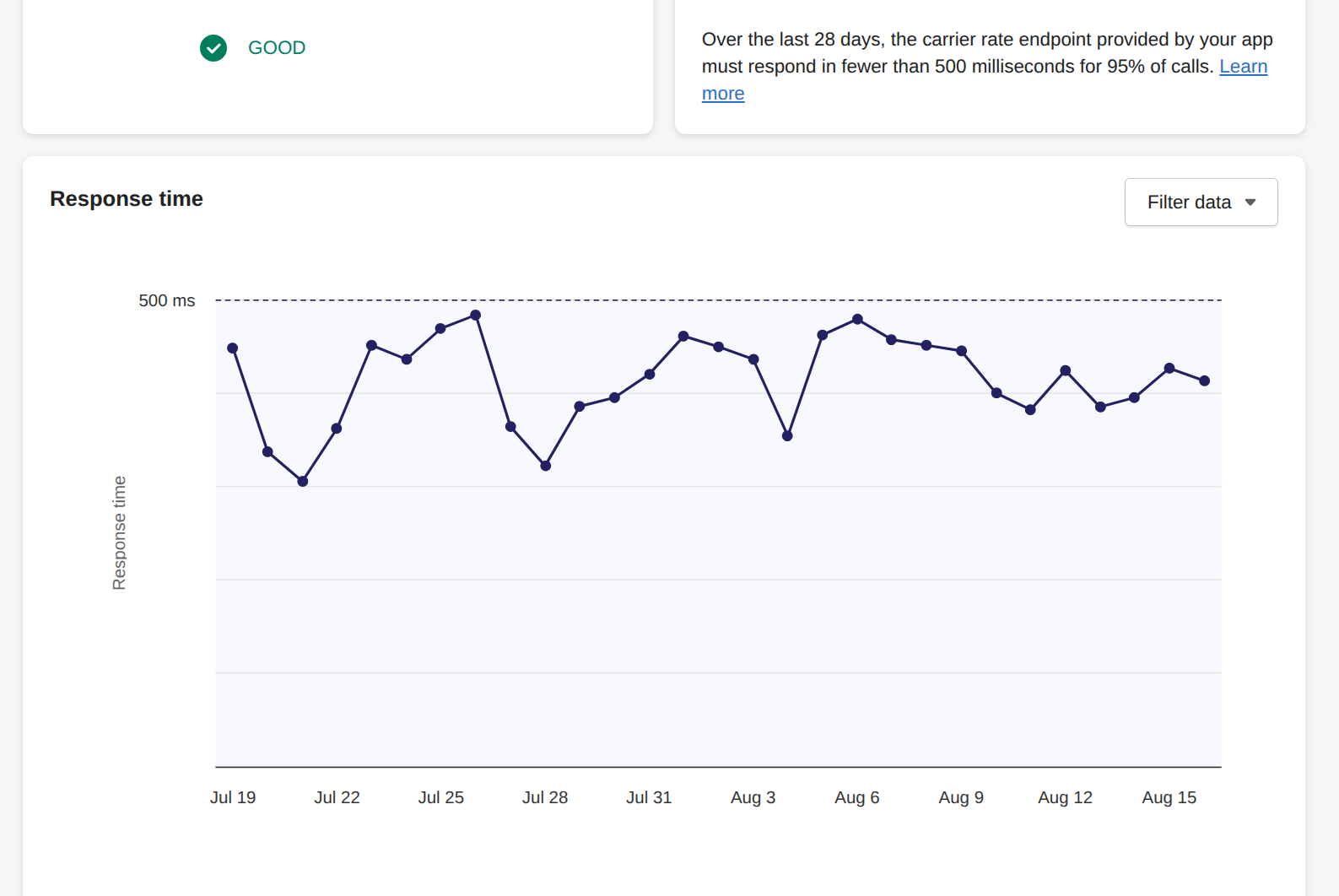
One thing to understand about that chart before anything else: Shopify measures from its cloud to ours and back. Most of that time is the network hop. Everything else - compute, inventory lookups, geocoding - adds to the request time, slowing the p95 lookup speed.
Rudimentary: Checking Shopify Inventory Within the Request
What does a Shopify Carrier Rate endpoint need to know? Essentially the origin and destination for each product in the cart. Ideally that’s a single origin (the shipping location) and a single destination (the delivery address). Note: with split carts, a single order can come from multiple locations.
Getcho has an additional need: to know if there are other locations that could fill an order. Shopify sends an assigned location based on order routing rules, but that location might not be the closest one. So we need to also check the inventory for each product in the cart within this one request.
Therefore, the most basic way to calculate rates is to run through each product and:
- Call the Shopify Admin API to check whether the items in the cart were in stock at the location we’d deliver from.
- Price the cart.
- Log the cart so we can track conversion rates
- Return rates.
That is several network calls on the hot path before the customer sees a shipping option. On a good day it took 500 ms; on a bad day almost a second. Any one of those services being slow, cold, or briefly unavailable meant a slow or missing rate. That would fail the bar outright.
Level 2: Checking and Caching Inventory Ahead of Time
We kept the backend but stopped letting it touch Shopify during the request. The key piece is the carts/update webhook.
Shopify fires carts/update every time a shopper adds, removes, or changes a line in the cart, seconds to minutes before they reach the shipping step. That is a head start, and we used it to do the slow work early. The webhook handler does almost nothing on its own request: make sure the request is coming from Shopify, pull the relevant product IDs, and kick off a job that fetches inventory levels for those variants from the Shopify API and writes them into Redis with a one-hour TTL (plus a variant-to-inventory-item map with a 24-hour TTL so later warms skip a lookup). carts/create does the same for a brand-new cart.
So when the CarrierService callback arrived, the rate handler read inventory straight from Redis and only fell back to the live fetch if a key was missing or expired.
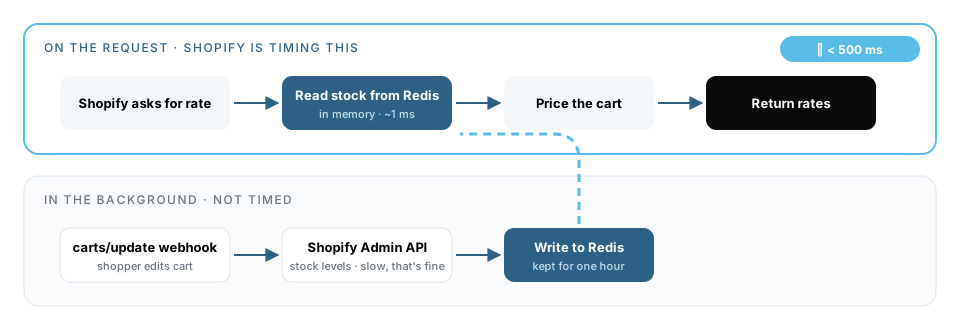
This got cache hits down to 10–50 ms. It fixed the median. It did not fix the tail. Cache misses and cold starts on a shared API still landed in the 95th percentile, and the 95th percentile is the only number Shopify looks at. This improved our average by 70ms.
Current Approach: Blazing Fast Cloud Functions, Data in Memory
The version that works has almost nothing in it.
Each merchant gets its own Google Cloud Function located physically close to the cloud region Shopify calls from. It has minimum instances set to one so it never cold-starts. The zip allowlist, price table, SKU eligibility, and cutoff times are data inside the function. There is no database, no Redis, and no geocoder on the request. If anything goes wrong, the function returns 200 {"rates": []} so Shopify gets an answer rather than a timeout.
At launch we measured 3 ms at the median and 45 ms at the 90th percentile inside the function.
The cost: we update the function constantly
Removing every network call from the request path means the function has no way to learn that anything changed. Inventory, prices, zip coverage, promotions — all of it is data inside the function, and all of it goes stale the moment the real world moves. Keeping it current is now an ongoing job, and it is a different job for each merchant.
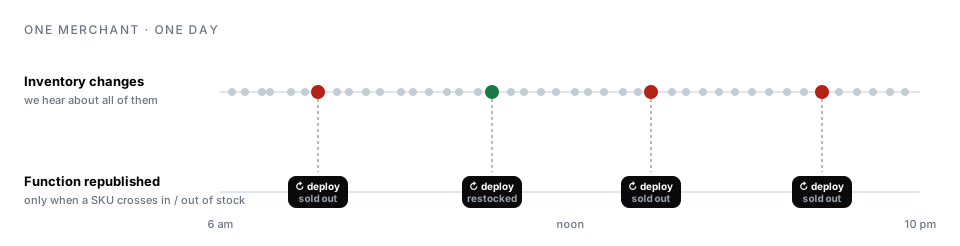
So the honest description of stage 3 is: the request is fast because all of the work is done ahead of time, off the request. For a rate table that changes a few times a year that is fine. For inventory that changes every day it means a recurring scan-and-redeploy, and a window between scans where the function is quoting against stale stock.
Summary
- Don’t make network calls inside the CarrierService callback. Load what you need ahead of time.
- Keep at least one instance warm so the first request after idle isn’t slow.
- Host in the same cloud region Shopify calls from (
us-central1). - On any error, return
200 {"rates": []}rather than letting the request time out. - Budget for keeping the baked-in data current. That is where the work went, not away.
If you’re building a carrier-service app and want to compare notes, we’re happy to — get in touch.