Same-Day Dispatch from Shopify POS: The Getcho POS Extension
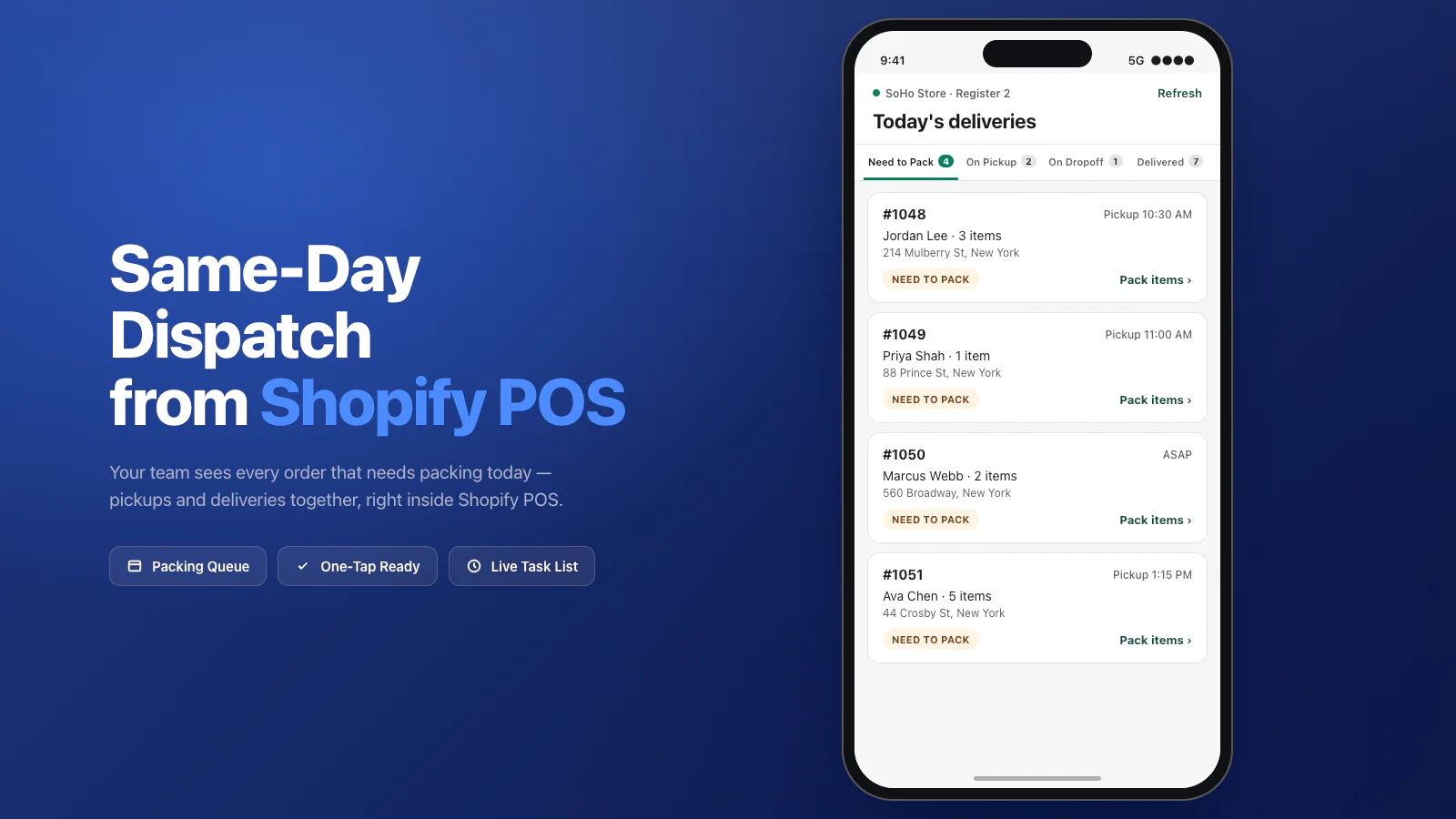
Getcho’s new Shopify POS Extension puts the same-day delivery queue inside Shopify POS. Store teams see every order that needs packing today, scan each item with the POS camera to verify the right SKU is going in the bag, and dispatch a courier in one tap — without leaving the register. It works on Shopify POS Lite, so no POS Pro subscription is required.
If you run a Shopify store with a physical location and you’re already using Getcho for same-day delivery, the POS Extension is what the last ten minutes before handoff have been missing.
The problem we kept hearing
Store teams were bouncing between Shopify POS for sales and a second tool to see what was queued for delivery. Orders fell between the cracks. Items got packed wrong. Somebody always had to “check the tablet in the back.”
For stores running Shopify POS Lite, the friction was worse — no native app support meant the packing queue lived somewhere else entirely, and the person running the register had no visibility into what needed to go out the door.
That whole loop is gone. The delivery queue now lives inside Shopify POS.
What’s in the release
The Getcho POS Extension is available today in the Shopify App Store. Here’s what ships with it:
- Tabbed task view inside Shopify POS — Need to Pack, On Pickup, On Dropoff, Delivered. Every same-day order that matters today is right there.
- Create a delivery from any Shopify order — pull any order into the POS view and dispatch it same-day, whether it was rung up at the register, placed online, or came in by phone.
- Slack or SMS pings when an order needs packing — no more “check the tablet in the back.” Your team gets notified the moment a new order hits the queue.
- Optional barcode verification with the POS camera — scan each item as you pack it. The POS confirms the right SKU for the order, so nothing ships unverified.
- Checklist fallback for items without barcodes — fresh goods, custom orders, florals, wine. Tap each row as it’s packed.
- One-tap ready — confirm the order is packed and the courier is dispatched automatically, matched by vehicle size, timing, and distance.
- Works on Shopify POS Lite — no POS Pro subscription needed.
Barcode scan on pack — the part everyone asks about first
The single feature store teams get most excited about: barcode scan on pack. Point the Shopify POS camera at the item, hear the beep, and the POS confirms it’s the right SKU for that order. Wrong item? You’ll know before it leaves the store — not after the customer opens the bag.
Why it matters in practice:
- Mispicks drop to near zero. The #1 cause of same-day refunds is the wrong item in the bag. Scan-on-pack kills that failure mode at the source.
- New hires get it on day one. No memorizing SKUs, no reading printed pick sheets upside down. Hand them a POS device and they can pack accurately from their first shift.
- No extra hardware. The POS camera is already in your team’s hands. No handheld scanner rentals, no separate packing station.
- Audit trail for every order. Each scan is timestamped against the order — if a customer disputes what they received, you have a record of exactly what was verified into the bag.
And when something doesn’t have a barcode — fresh bread, a custom cake, a wine club bottle, a bouquet — the POS falls back to a checklist view. Tap each row as it’s packed. Same one-tap “Ready” button when everything’s checked.
Why POS Lite support matters
Most same-day delivery apps that integrate with Shopify POS require the POS Pro subscription, which runs $89/month per location on top of your Shopify plan. For a small bakery, a single-location florist, or a wine shop trying same-day for the first time, that’s a meaningful barrier.
The Getcho POS Extension runs on POS Lite, which is the default POS tier included with every Shopify plan. If you’re already using Shopify POS for in-person sales, the extension installs and runs inside it — no upgrade, no additional subscription.
How the ten-minute window changes
Same-day delivery lives or dies in the ten minutes between “order received” and “courier leaves with the bag.” That window is where mispicks happen, where items get forgotten, where the wrong size goes out — and where someone ends up on the phone with a customer apologizing.
Before the POS Extension, that window was a handoff between systems: Shopify for the sale, a separate app for the pack, a driver app for the dispatch. Each hop was a chance to drop something.
Now the window lives entirely inside Shopify POS:
- Order comes in → Slack/SMS ping → it appears in Need to Pack.
- Team member opens the order → scans each item (or checks it off) → taps Ready.
- Courier is dispatched automatically → the order moves to On Pickup.
- Driver picks up → On Dropoff → Delivered. Customer sees your branded tracking page the entire time.
No tablet in the back. No second login. No copy-pasted addresses.
How to install
If you’re already on Getcho, the POS Extension is available in the Shopify App Store alongside the core Getcho app. If you’re new:
- Install the Getcho Same-Day Delivery app from the Shopify App Store.
- Add the Getcho POS Extension to Shopify POS on each register where your team packs orders.
- Configure Slack or SMS notifications and your barcode/checklist preferences.
- Start dispatching from the register.
Same-Day Dispatch from Shopify POS
Install the Getcho POS Extension and run your same-day delivery queue from inside Shopify POS — including Shopify POS Lite. No developer, no second tablet.
Install on Shopify →Frequently Asked Questions
What is the Getcho Shopify POS Extension? The Getcho Shopify POS Extension embeds the same-day delivery queue directly inside Shopify POS. Store teams see every order that needs packing today, with tabs for Need to Pack, On Pickup, On Dropoff, and Delivered. They can scan items with the POS camera, confirm packing, and dispatch a courier in one tap — without leaving Shopify POS.
Does the POS Extension work on Shopify POS Lite? Yes. The Getcho POS Extension works on Shopify POS Lite — no POS Pro subscription required. That means any merchant using Shopify POS, even at the base tier, can run same-day delivery operations from the register.
How does barcode verification work in the POS Extension? The POS Extension uses the device camera to scan barcodes as your team packs each order. Scan an item and the POS confirms it’s the right SKU for the order. If the item doesn’t have a barcode — fresh goods, custom cakes, florals — the team uses a checklist fallback and taps each row as it’s packed. Either way, nothing ships unverified.
Can I create a delivery from a Shopify order already placed in POS? Yes. From inside Shopify POS, your team can pull any Shopify order and create a same-day delivery for it on the spot. Walk-in customers who want it delivered later, order-ahead customers who change their mind, phone orders rung into POS — all handled from the same tabbed task view.
How do store teams know a new order needs packing? When a same-day order comes in, the Getcho POS Extension notifies your team via Slack or SMS — whichever channel you’ve configured. The order automatically appears in the Need to Pack tab inside Shopify POS, so whoever’s on the floor can pick it up without checking a separate tablet.
Does the POS Extension replace the Getcho Shopify app? No — it extends it. The core Getcho Shopify app handles order sync, checkout options, multi-location routing, and auto-dispatch for online orders. The POS Extension is the in-store layer: it gives your register team the packing queue, verification, and one-tap dispatch inside Shopify POS. Install both from the Shopify App Store.